Sale Price Calculator
| Sale Price | Base Price | Calculated Amounts | Profits | ||||
|---|---|---|---|---|---|---|---|
| Grab Daily | FP ODD | FP Daily | Grab Daily Profit | FP ODD Profit | FP Daily Profit | ||
| Sale Price | Base Price | Calculated Amounts | Profits | ||||
|---|---|---|---|---|---|---|---|
| Grab Daily | FP ODD | FP Daily | Grab Daily Profit | FP ODD Profit | FP Daily Profit | ||
static bool isPalindrome(string word)
{
    string rword = "";

    foreach (var c in word)
        rword = c + rword;

    return rword.ToUpper() == word.ToUpper() ? true : false ;

}
|
|
DirectoryInfo di = newDirectoryInfo(Server.MapPath("/"));
FileInfo[] fi = di.GetFiles();
fi = di.GetFiles("*.*");
foreach (FileInfo fi1 in di.GetFiles())
{
Response.Write( fi1.FullName.ToString());
Response.Write("<br />");
}
Make 2 forms name it page1.aspx and page2.aspx
on page1.aspx:
Add a TextBox and Button Control
Go to the Button Control Properties and set the PostbackUrl = "~/page2.aspx"
on Page2.aspx:
Add a Label Control and on the Page_Load Event add this following code.
protectedvoidPage_Load(objectsender, EventArgs e)
{
if (PreviousPage != null)
{
if (PreviousPage.IsCrossPagePostBack == true)
{
Label1.Text = "Cross-page post.";
TextBox tb = (TextBox)PreviousPage.FindControl("TextBox1");
this.Title = tb.Text;
}
}
else
{
Label1.Text = "You are not allowed to access this page!";
}
}
Step 1: 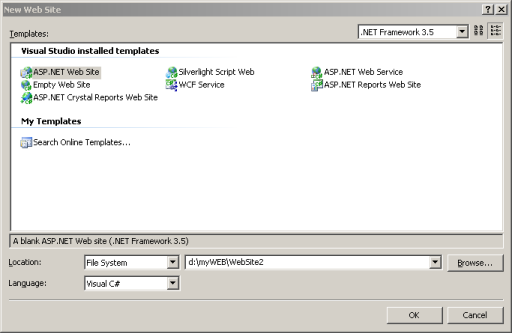
Make a new Web Project
Step 2: 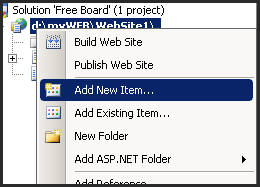
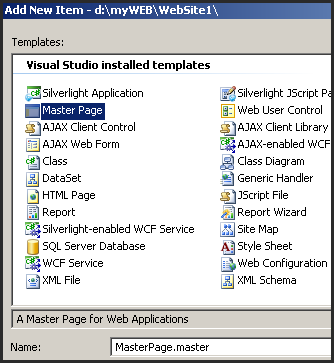
Click on the Solution Explorer and Add New Item and Select the Master Page
Step 3: 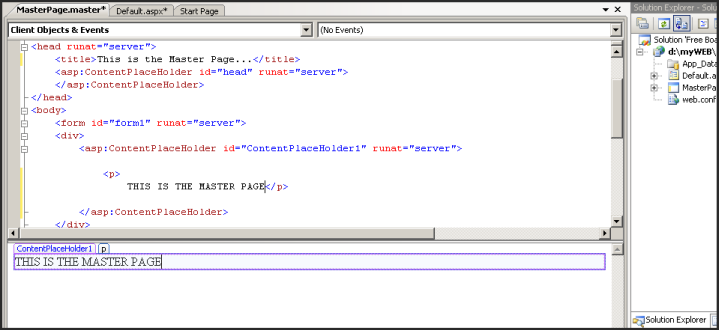
Put a content on your Master Page
Step 4: On the script section of the DEFAULT.ASPX put the MasterPageFile="~/MasterPage.master" tag and delete the html section of the file 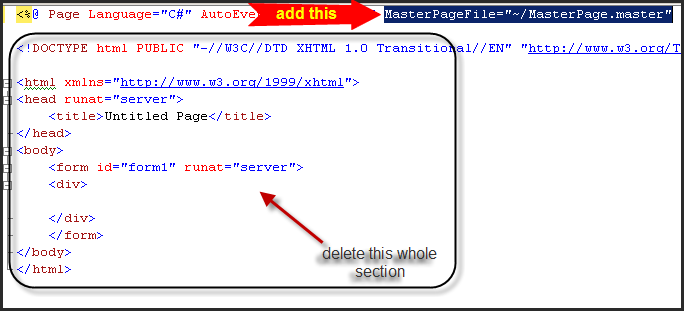
Now your ready to go...
 First of all i would like to greet Calvin's Hub a happy birthday and more traffic to come. In celebration to his first year anniversary Calvin's hub launch it's first contest and it is dubbed as "Calvin's Hub Domain Name Giveaway Contest" obviously the winner will get a free domain name and hopefully it comes with a free domain hosting too. :) so if you want to win your own Domain Name join now. oh before i forget please put me as your referral :) ..
visit : www.calvinshub.com
Backup MySQL Database to a file
 Backing up your database is a very important system administration task, and should generally be run from a cron job at scheduled intervals. We will use the mysqldump utility included with mysql to dump the contents of the database to a text file that can be easily re-imported.
Syntax:
mysqldump -h localhost -u root -pmypassword databasename > dumpfile.sql
Example:
mysqldump -h localhost -u root -p2Uad7as9 database01 > dumpfile.sql
This will give you a text file containing all the commands required to recreate the database.
Search Keyword Ranking is a SEO Desktop application tool, I made that will automatically check the position of your URL for a specified Keyword on Google.

System Requirement:
Windows XP/Vista and .NET Framework 3.5
Here is a sample program that will monitor your clipboard , as of right now it can only monitor text or images...
Download the Source Code :ClipboardMonitor.rarCode:
using System;
I saw this article on a forum, i think it is a very useful article regarding Office Automation
This FAQ 101 is a listing of handy links for getting started with .NET Automation/Interoperation of Microsoft Office programs such as Excel, Word, Access or Outlook.The first place to start learning about how to integrate MS Office programs into your .NET application is the tutorial Automating Office Programs with VB.NET. It discusses what you need to know to get started, as well as addressing some of the difficulties with .NET Automation such as execution speed and deployment issues. If you are new to .NET Interoperation/Automation, then this link is a good place for you to begin.
For articles on how to fully utilize the Excel object model, Word, and Outlook please check out the following links:
(1) Understanding the Excel Object Model from a .NET Developer's Perspective
(2) Understanding the Word Object Model from a .NET Developer's Perspective
(3) Programming Microsoft Outlook with Visual Studio .NET
(We still lack a resource for utilizing the Access object model in .NET, so if someone knows of a good source, please send me a private message and we will be glad to add it.)
Some advanced forums on MS Office programming include:
(1) .NET Office Automation (XVBT)
(2) Visual Studio Tools for Office Forum (MSDN)
(3) COM Add-ins Forum (MSDN)
(4) Interoperation / Office Integration (XDNT)
Microsoft Office Programs are still COM ActiveX Servers, so the best help regarding specific commands or techniques can be often found in the VBA Forums. If your question is .NET-specific, please place your question in the .NET Office Automation forum. But if your question regards the Microsoft Office object model, as called from VBA or Visual Basic 6.0, then the following VBA/VB6 Office Integration forums can be your best bet:
(1) VBA / Office Integration forum (XVBT)
(2) Excel VBA forum (XVBT)
For some general articles regarding MS Office Interoperation from your .NET application, see the following links:
(1) Automating Office Programs with VB.NET
(2) Creating Office Managed COM Add-Ins with Visual Studio .NET
(3) HOWTO: Run Office Macros by Using Automation from Visual Basic
(4) Develop Microsoft Office Solutions with Visual Studio .NET
For articles dealing with execution or deployment issues and problems:
(1) Office Application Does Not Quit After Automation from VS.NET Client
(2) Microsoft Office XP PIAs Are Available for Download
(3) Office XP Primary Interop Assemblies Known Issues
Add Google Search in your Website
Just Copy & Paste the code below on your Site


Public Function XOREncryption(CodeKey As String, DataIn As String) As String
Dim lonDataPtr As Long
Dim strDataOut As String
Dim intXOrValue1 As Integer, intXOrValue2 As Integer
For lonDataPtr = 1 To Len(DataIn)
'The first value to be XOr-ed comes from
' the data to be encrypted
intXOrValue1 = Asc(Mid$(DataIn, lonDataPtr, 1))
'The second value comes from the code ke
' y
intXOrValue2 = Asc(Mid$(CodeKey, ((lonDataPtr Mod Len(CodeKey)) + 1), 1))
strDataOut = strDataOut + chr(intXOrValue1 XOr intXOrValue2)
Next lonDataPtr
XOREncryption = strDataOut
End Function
'USAGE
Private Sub cmdEncryptdecrypt_Click()
Dim strCodeKey As String
strCodeKey = InputBox("Please enter your password", "XOr Encryption")
txtSource.Text = XOREncryption(strCodeKey, txtSource.Text)
End Sub
