Add Google Search in your Website
Just Copy & Paste the code below on your Site
Showing posts with label Code. Show all posts
Showing posts with label Code. Show all posts
Sunday, December 9, 2007
Add Google Search Code on your Website

Friday, December 7, 2007
XOR Encryption in VB
Public Function XOREncryption(CodeKey As String, DataIn As String) As String
Dim lonDataPtr As Long
Dim strDataOut As String
Dim intXOrValue1 As Integer, intXOrValue2 As Integer
For lonDataPtr = 1 To Len(DataIn)
'The first value to be XOr-ed comes from
' the data to be encrypted
intXOrValue1 = Asc(Mid$(DataIn, lonDataPtr, 1))
'The second value comes from the code ke
' y
intXOrValue2 = Asc(Mid$(CodeKey, ((lonDataPtr Mod Len(CodeKey)) + 1), 1))
strDataOut = strDataOut + chr(intXOrValue1 XOr intXOrValue2)
Next lonDataPtr
XOREncryption = strDataOut
End Function
'USAGE
Private Sub cmdEncryptdecrypt_Click()
Dim strCodeKey As String
strCodeKey = InputBox("Please enter your password", "XOr Encryption")
txtSource.Text = XOREncryption(strCodeKey, txtSource.Text)
End Sub
Tuesday, October 23, 2007
Read INI File in VB ( Visual Basic )
Declare
Public Declare Function GetPrivateProfileString Lib "kernel32" Alias "GetPrivateProfileStringA" (ByVal lpApplicationName As String, ByVal lpKeyName As Any, ByVal lpDefault As String, ByVal lpReturnedString As String, ByVal nSize As Long, ByVal lpFileName As String) As Long
Code Function
Private Function INIRead(iAppName As String, iKeyName As String, iFileName As String) As String
Dim iStr As String
iStr = String(255, Chr(0))
INIRead = Left(iStr, GetPrivateProfileString(iAppName, ByVal iKeyName, "", iStr, Len(iStr), iFileName))
End Function
Public Declare Function GetPrivateProfileString Lib "kernel32" Alias "GetPrivateProfileStringA" (ByVal lpApplicationName As String, ByVal lpKeyName As Any, ByVal lpDefault As String, ByVal lpReturnedString As String, ByVal nSize As Long, ByVal lpFileName As String) As Long
Code Function
Private Function INIRead(iAppName As String, iKeyName As String, iFileName As String) As String
Dim iStr As String
iStr = String(255, Chr(0))
INIRead = Left(iStr, GetPrivateProfileString(iAppName, ByVal iKeyName, "", iStr, Len(iStr), iFileName))
End Function
Sunday, September 16, 2007
C# Link Generate to HTML Code
Here is a sample program where user can generate HTML Link code just by inputing the address and description of the Site.. then the application will automatically generate the code
using System;
using System.Collections.Generic;
using System.ComponentModel;
using System.Data;
using System.Drawing;
using System.Text;
using System.Windows.Forms;
namespace Link
{
public partial class Form1 : Form
{
public Form1()
{
InitializeComponent();
}
private void button1_Click(object sender, EventArgs e)
{
String linkname = "", linksite = "", linkdesc = "", linkResult;
linkname = textBox1.Text;
linksite = textBox2.Text;
linkdesc = textBox3.Text;
string link = "" + linkname + "";
if (textBox4.Text != "" )
{
textBox4.Text += "
" + link;
}
else
{
textBox4.Text = link;
}
}
private void button2_Click(object sender, EventArgs e)
{
textBox4.SelectAll();
textBox4.Copy();
}
private void linkLabel1_LinkClicked(object sender, LinkLabelLinkClickedEventArgs e)
{
WebBrowser web = new WebBrowser();
linkLabel1.Text = SiteAdvertise(1);
web.Navigate("http://zoul1380.blogspot.com","_new");
}
}
}
screen shot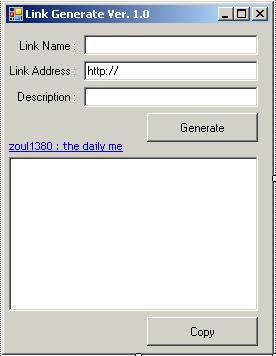

Source Code:
using System;
using System.Collections.Generic;
using System.ComponentModel;
using System.Data;
using System.Drawing;
using System.Text;
using System.Windows.Forms;
namespace Link
{
public partial class Form1 : Form
{
public Form1()
{
InitializeComponent();
}
private void button1_Click(object sender, EventArgs e)
{
String linkname = "", linksite = "", linkdesc = "", linkResult;
linkname = textBox1.Text;
linksite = textBox2.Text;
linkdesc = textBox3.Text;
string link = "" + linkname + "";
if (textBox4.Text != "" )
{
textBox4.Text += "
" + link;
}
else
{
textBox4.Text = link;
}
}
private void button2_Click(object sender, EventArgs e)
{
textBox4.SelectAll();
textBox4.Copy();
}
private void linkLabel1_LinkClicked(object sender, LinkLabelLinkClickedEventArgs e)
{
WebBrowser web = new WebBrowser();
linkLabel1.Text = SiteAdvertise(1);
web.Navigate("http://zoul1380.blogspot.com","_new");
}
}
}
Monday, September 3, 2007
C# Sample Code : Exercise Palindrome
Filename: Program.CS
Class Filename : clsCheckWord.cs
using System;
using System.Collections.Generic;
using System.Text;

namespace Exercise_02___Palindromes
{
    class Program
    {
        //string aword;

        static void Main(string[] args)
        {
            bool wResult;

            Console.WriteLine("Palindrome Checker");


            for (int x = 0; x < 20; x++)
            {
                Console.Write("=");
            }
            Console.WriteLine();
            Console.Write("Input String : ");
            string aword = Console.ReadLine();

            clsCheckWord CheckWord = new clsCheckWord();

            CheckWord.Givenword = aword;
            int ix = CheckWord.isPalindrome();

            if (ix == 1)
            {
                Console.Write("Result : A Valid Palindrome");
            }
            else
            {
                Console.Write("Result : Not A Palindrome");
            }

            Console.ReadLine();
        }
    }
}
Class Filename : clsCheckWord.cs
using System;
using System.Collections.Generic;
using System.Text;

namespace Exercise_02___Palindromes
{
    class clsCheckWord
    {
        public clsCheckWord(){}

        public string givenword="";

        public string Givenword
        {
            get { return givenword; }
            set { givenword = value; }
        }

        public int isPalindrome()
        {
            string tmpcomp="";

            for (int x = 0; x < givenword.Length; x++)
            {
                tmpcomp = givenword.Substring(x, 1) + tmpcomp;
            }

            if (tmpcomp == givenword)
            {
                return 1;
            }
            else
            {
                return 0;
            }
        }
    }
}
Sunday, November 26, 2006
Open Read/Write File Code Download
i've decided to upload a sample code of my two previous post.
to download the code please click here
the password is: kodekruncher
to download the code please click here
the password is: kodekruncher
Subscribe to:
Posts (Atom)